Instant On! FAQs Do I need to have the NetZero software running for NetZero Instant On! to work?
Although you do not need to have the NetZero Welcome Screen open for NetZero Instant On! to work, you do need to have the system tray icon on. If you close the NetZero software, ensure that the icon in the system tray still appears. If that icon closes when you exit NetZero, you will have to change that setting. To change the Taskbar Icon setting: - Double-click the NetZero desktop icon.
- Right-click the NetZero Icon in the system tray.
- Select Options.
- Ensure there is no checkmark next to Close the NetZero Taskbar Icon when I disconnect.
- If there is a checkmark, highlight that option and click once to remove it.
Can I surf the net at the same time my info is being downloaded?
If you interrupt an NetZero Instant On! session to surf the Internet, the session will be terminated and you will lose the information that was being downloaded. If you can wait, you will be given the option of using the NetZero Instant On! connection to surf the Internet when the session is coming to a close.
If I have multiple accounts can I have all the info for each one retrieved?
Only one NetZero HiSpeed account can have information retrieved at a time. The Member ID that is on the connection screen during the designated Time Slot(s) will have its information downloaded.
What happens if I log into my account through another computer while NetZero Instant On! is running?
If you log onto your NetZero account through another computer at the same time NetZero Instant On! is running on your home computer, the normal content will not be downloaded for that session. It will start again at the next scheduled Time Slot and gather the specified information then.
Do I have to leave my computer on all day?
In order for NetZero Instant On! to dial into NetZero your computer needs to be on during a specified Time Slot. However, if you know when NetZero Instant On! is set to launch, your computer can be off as long as you turn it on in time for that session.
Will NZTV appear every time my computer logs on?
When NetZero Instant On! is enabled, NZTV will appear as normal and your NetZero HiSpeed toolbar will show the words Dialing when you are being connecting to the Internet. When you are connected, the NetZero Instant On! Session popup will appear on screen and the word Online will appear on the HiSpeed toolbar.
Is there a limit to how long NetZero Instant On! will be running?
When NetZero Instant On! is launched, there is a maximum 40-minute time limit from the time of connection to the end of the session. This time period may be shorter depending on how much information is being downloaded. The time period will not be longer than 40-minutes however, as the software will stop running automatically when one of these conditions is met: - All information is successfully downloaded
- The 40-minute time limit is up
- You stop the Instant On! connection manually
How many times can NetZero Instant On! be used in one day?
When you are selecting Time Slots for NetZero Instant On! to connect to the Internet, there is a maximum number of 7 Time Slots that you can choose.
What happens if I do not choose any specified Time Slots?
If none of the Time Slots for NetZero Instant On! suit your needs, you can choose to leave that section blank and NetZero Instant On! will connect automatically when your computer is online but idle. The session will run until you manually interrupt or the specified information is gathered. If you do not manually connect to the Internet after NetZero Instant On! has finished running, it will disconnect you from the Internet as it normally would when your computer is idle.
Is it possible to stop NetZero Instant On! in the middle of a session?
Yes, if you would like to stop NetZero Instant On! from downloading information, you can click Disconnect from the NetZero Instant On! Session popup that appears onscreen while the feature is running. Please note that if you stop the session before all of the information is gathered, you will lose all downloaded content.
What happens if the phone rings and disconnects NetZero Instant On!?
If an NetZero Instant On! session is disconnected by any action not initiated by the user, such as incoming phone calls, the software will try to reestablish a connection with NetZero. If a connection cannot be reached in 2 tries, then the software will stop trying to connect and resume and idle state until you log onto NetZero manually or the next scheduled NetZero Instant On! session arrives. 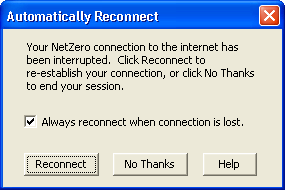
What if I am disconnected partway through the download, can I still get what was already retrieved?
If your NetZero Instant On! connection is lost due to an action not initiated by you, such as incoming phone calls, the software will try to reestablish a connection with NetZero. If a connection is reestablished then your information will continue to be downloaded until complete.
Back to the NetZero Instant On! Help Page
Back to the NetZero HiSpeed Index Page
| 



 My Password




