Setting up your NetZero Instant On! In order to enable NetZero Instant On! software, you must subscribe to NetZero HiSpeed, and your computer must be left on and connected to your phone line at all times of the day when NetZero Instant On! is set to run. If your computer is set to hibernate after a certain number of minutes of inactivity, you must disable Hibernation mode in order to use NetZero Instant On! For directions on how to adjust your computer, click here. You can set up NetZero Instant On! in two ways. If you are connecting to the Internet using the latest NetZero HiSpeed software, you will notice a pop-up to set up NetZero Instant On!. Click Get it Now! on the pop-up window to get started. If the NetZero Instant On! pop-up does not appear or if you are already connected to the Internet using NetZero, please follow the steps listed below. - Right-click the NetZero icon in the system tray and select Exit NetZero.
- Double-click the NetZero icon on your desktop
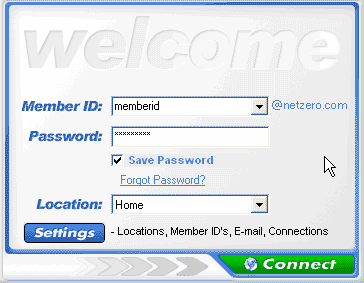
 - Once you have opened the Welcome screen make sure you have entered your Password and that you have checked the Save Password box. Then, click on the Settings button.
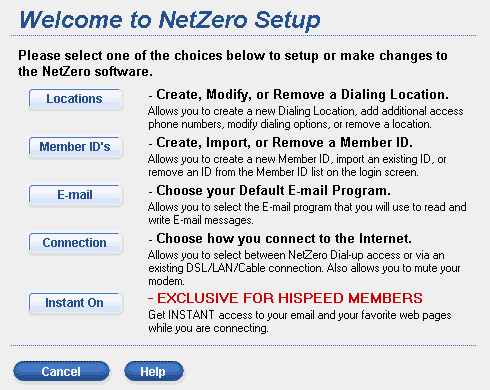
 - On the Welcome to NetZero Setup screen, click Instant On!.
 - Check the box Yes I want Instant On!.
- Under Pick a Time, click on a time slot
- Click Add.
- The time will appear under My Times.
- Repeat this for every hour that you want to use NetZero Instant On!.
Note: If you do not select a Time Slot, Instant On! will launch automatically at a time when you are online and your computer is idle.
- If you do not want your computer to gather information on the weekends check the box: Do not dial out on the weekend.
- If you would like the NetZero software dial-in to the Internet every time you start your computer, check the box I also want to connect to the Internet each time I start my computer.
- Click Continue.
Note: The NetZero HiSpeed software must be running in order to use NetZero Instant On! To verify whether your software is running, look for the  icon in the lower right corner of your screen, next to your system clock (as shown below). icon in the lower right corner of your screen, next to your system clock (as shown below). 
Back to the NetZero Instant On! Help Page
Back to the NetZero HiSpeed Index Page
| 



 My Password




