Reset the Pop-Up Blocker Counter The Pop-up Blocker from NetZero HiSpeed blocks the pop-up ads that appear on certain Web sites while you are surfing the Internet. You can delete the blocked pop-ups and start the counter over for every session or leave the counter running continuously. If you do not wish to keep track of how many pop-ups are blocked you can disable this feature. To Reset the Pop-up Counter: - Right-click the Pop-up Blocker icon on the HiSpeed Toolbar
- Select Reset blocked pop-up count.
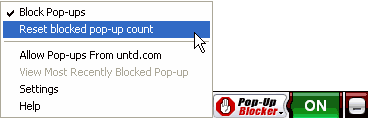 - The counter will be reset and the word ON will appear.
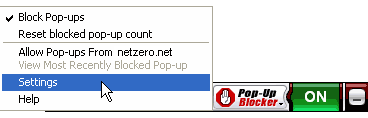
To Disable the Pop-up Blocker: - Click the Pop-up Blocker icon on the NetZero HiSpeed Toolbar.
- Select Settings.
 - Select the Advanced tab.
- Click the Pop-up Blocker... button.
- Check the box Disable the Pop-up Blocker software.
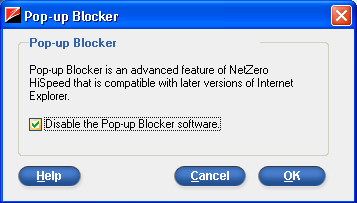 - Click OK.
- Click OK again.
| 



 My Password





