Turbo Web Page Acceleration A new feature that is available to NetZero HiSpeed members is Turbo Webpage Acceleration. With Turbo Webpage Acceleration, you can download web pages faster than ever before. This is made possible as the NetZero HiSpeed Turbo technology uses a computers cache, making the web page load many times faster.
Turn off Turbo Web Page Acceleration
Turbo Cache
Turbo Webpage Acceleration is turned ON by default. However, if you wish to turn this feature off, then please try the steps listed below. Turn off Turbo Web Page Acceleration - Click the NetZero HiSpeed icon in the toolbar and select Settings.
- Click on the Advanced tab and uncheck the box next to Enable Turbo Acceleration.
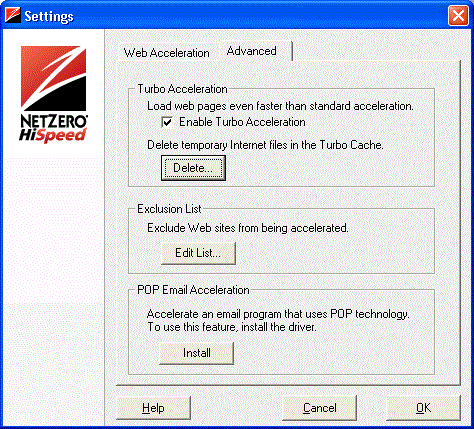 - Click OK.
Note: If you do not wish to accelerate certain Web pages, you can add them to your Exclusion List. Click here to learn more about the Exclusion List.
Turbo Cache - Click the NetZero HiSpeed icon in the toolbar and select Settings.
- Click on the Advanced tab and click the Delete button under Delete temporary Internet files in the turbo cache.
- Click Yes to clear the cache, or No to cancel.
- Click OK to finish.
| 



 My Password





