Common Connection Errors / Solutions Error 553: Domain is not in my list of RCTP Hosts (I can receive email but I can't send email) This page applies to Windows 95/98/ME/NT4 users only. If you are able to receive email but can't send any, you may be getting a 553 error, which can be caused by a variety of factors. The following information should help you to determine the cause of the error and offer a solution.
A. Have you configured your Outgoing Mail Server correctly? For directions on how to configure your email program to check your NetZero mail, click here.
B. Try another access number. In some instances, changing access numbers can clear up a 553 error. For instructions on how to change your access number, please click here.
C. None of these apply to me, but I'm still receiving this errorIf you still can't send mail successfully, you may consider using NetZero's Message Center option, which allows you to send and receive NetZero email from any location, using any ISP or network connection. To access Message Center, click here. If you prefer to use your dedicated email program, we will need some assistance from you to fix the issue. Please follow these steps so we can resolve the problem and get you back on track: - Dial in to NetZero. If you determine that you are having problems sending, STAY CONNECTED, then:
- Click on the Windows Start button and click on Run.
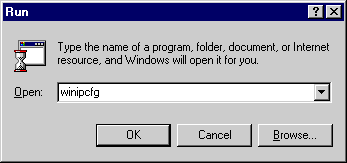 - In the Open field, type: winipcfg and click OK.
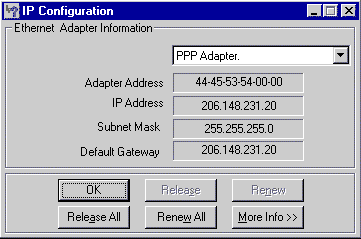 - From the drop-down menu, select PPP Adapter.
- Find the listed IP Address, copy it down exactly, then:
- Click here to send an email to Customer Support.
We will then escalate this information and have the IP address added to our system.
| 



 My Password





