Help Center Home

 My Billing Statement

 My Services

 My Password

 Update My Payment Info

 Update My Address

 Upgrade My Account

 Billing Questions

 Connection Issues

 Email Questions

Get NetZero Software

 Safety/Security

 Contact Us

 
Select a different
Operating System


Using the Exclusion List

The exclusion list feature enables you to tell NetZero HiSpeed 3G to not accelerate specific Web sites. This is useful if you regularly visit sites that have special features which do not work properly when accelerated by NetZero HiSpeed 3G. Using the exclusion list provides an alternative to temporarily disabling NetZero HiSpeed 3G each time you visit these sites.

To bypass NetZero HiSpeed 3G for certain Web sites:

  1. Right-click the NetZero HiSpeed 3G speedometer icon.
  2. Select Settings.
  1. Click the Speed & Image Quality tab.
  2. Click on the Click Here to exclude sites from being accelerated link.
  1. To exclude a Web site and all its associated pages, type the domain of the address (such as somewebsite.com) into the text box.
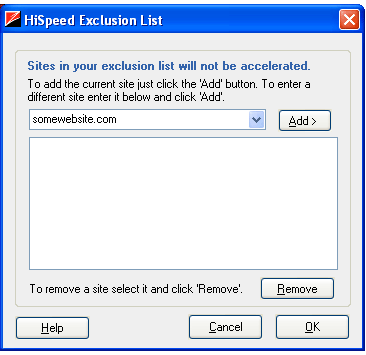
  1. Click Add to add the site to your Excluded Sites list.
  2. Click OK.

The sites you entered will now be excluded from NetZero HiSpeed 3G acceleration.


Print This Page

Now viewing
support for
NetZero Free Service
PlatformWindows
OSWindows98
BrowserCCBot 1.0


NetZero Home | My NetZero | Help | My Account | Corporate | Join Now
About NetZero | About United Online | Our Services | Advertisers | Investors | Press | Privacy Statement | Your Privacy Rights  | Terms of Service

        United Online             FTD        |        Classmates.com        |        MyPoints        |        NetZero        |        Juno        |        MySite        |        FreeInternet.com    

© 1998-2009 NetZero, Inc. NetZero is a registered trademark, and the NetZero logo is a trademark of NetZero, Inc.
NGCV