Help Center Home

 My Password

 Billing and Usage History

 Payment and Account         Info

 Update My Address

 Upgrade My Account

 Billing Questions

 Access Numbers

 Connection Issues

Get NetZero Software

 Safety/Security

 Contact Us

 
Select a different
Operating System


How do I scan for viruses using Norton AntiVirus Online?

To run a scan for viruses using Norton AntiVirus Online:

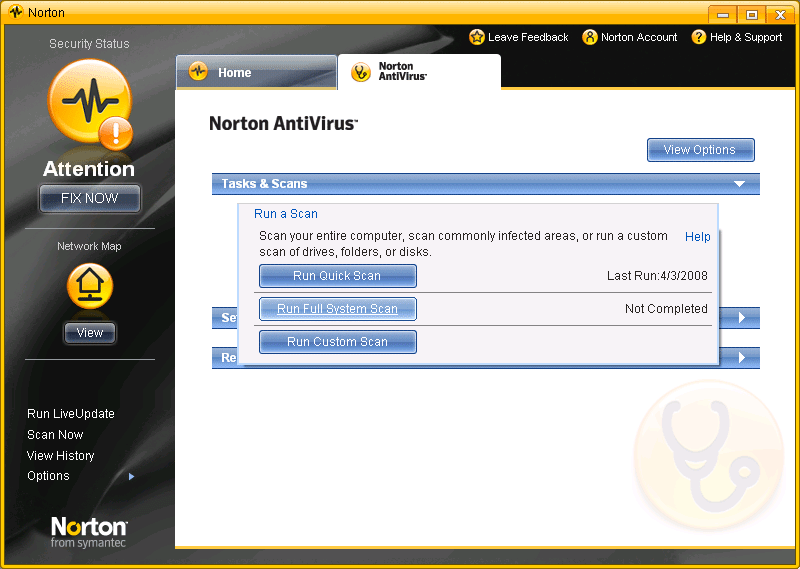
  1. Start Norton AntiVirus Online and click the Norton AntiVirus Online tab.
  2. Click on the Tasks and Scan bar, then select Run a scan.
  3. Click Run Full System Scan.

  1. The scan may take up to 45 minutes or longer to complete, depending on how big your hard drive is.
  2. When the scan is completed, click Finish. If the scan discovers any viruses or other security problems, follow the instructions to remove the threats.

If you need any further assistance, please click here for a list of available support options.


Related Items:

How do I Install and Activate Norton AntiVirus Online?
How do I activate my Norton Program?
How do I scan for viruses in Norton AntiVirus Online?
How do I Enable or Disable Auto-Protect in Norton AntiVirus Online?
How do I Enable or Disable Email Scanning in Norton AntiVirus Online?

Return to Norton AntiVirus Online - Frequently Asked Questions page


NetZero Home | My NetZero | Help | My Account | Corporate | Join Now
About NetZero | About United Online | Our Services | Investors | Press | Privacy Policy | Your Privacy Rights: Do Not Sell My Info  | About Ads  |   Terms of Service

        United Online                NetZero        |        Juno        |        MySite    

© 1998-2020 NetZero, Inc. NetZero is a registered trademark, and the NetZero logo is a trademark of NetZero, Inc.
NGCV