Help Center Home

 My Billing Statement

 My Services

 My Password

 Update My Payment Info

 Update My Address

 Upgrade My Account

 Billing Questions

 Connection Issues

 Email Questions

Get NetZero Software

 Safety/Security

 Contact Us

 
Select a different
Operating System

Download a Copy of the NetZero HiSpeed 3G Software (Current Members)

  1. Go to http://my.netzero.net/s/download to get started.

    The following screen will appear:
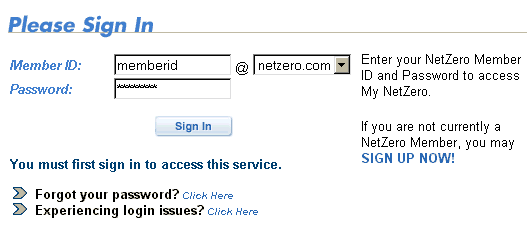
  1. Enter your Member ID and password.

    Note: If you are not already a NetZero member, click the SIGN UP NOW link. If you forgot your password, click on the link next to Forgot your password?

  2. Click on the Log In button.
  1. Click on the NetZero HiSpeed 3G Software link to begin your download.
  1. Click the appropriate Download Now button to begin the download process.
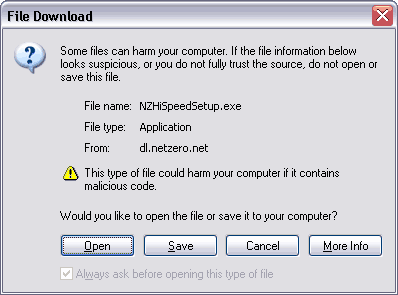
  1. When the File Download window appears, select Open or Run this program from its current location.

  2. Follow the directions on your screen to complete the installation process. NetZero HiSpeed 3G will automatically run next time you log on with your Member ID.

For information on download and activating Norton AntiVirus software, click here.


Print This Page

Now viewing
support for
NetZero Free Service
PlatformWindows
OSWindows98
BrowserCCBot 1.0


NetZero Home | My NetZero | Help | My Account | Corporate | Join Now
About NetZero | About United Online | Our Services | Advertisers | Investors | Press | Privacy Statement | Your Privacy Rights  | Terms of Service

        United Online             FTD        |        Classmates.com        |        MyPoints        |        NetZero        |        Juno        |        MySite        |        FreeInternet.com    

© 1998-2010 NetZero, Inc. NetZero is a registered trademark, and the NetZero logo is a trademark of NetZero, Inc.
NGCV