Common Macintosh Errors / Solutions Internet Connect - The connection has failed because you have not entered a telephone number This page applies to Mac OS X users only.If you get a message stating "The connection has failed because you have not entered a telephone number," it is due to your network being set up to automatically connect to the Internet when needed, but not finding a number for the purpose. While NetZero uses Internet Connect to get online, it must use its own software to maintain the connection. A. Disable the option to "Connect automatically when needed" - Go to the Apple menu and select System Preferences...
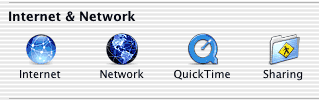
- In the Internet & Network section, click Network icon.
 - Next to Show, click the drop-down menu to display Internal Modem.
- Select the PPP tab and click the PPP Options button.
 - Make sure the box next to Connect automatically when needed is unchecked.
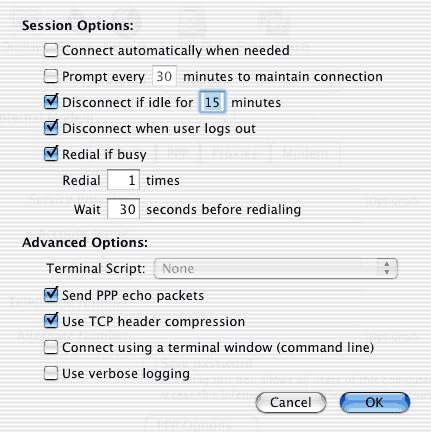 - Click OK.
- Click Apply Now and close the System Preferences.
Retry your NetZero connection
| 



 My Password





